Comparison

OpenClaw vs Dooza: Self-Hosting or a Managed Alternative?

OpenClaw is a capable, free, open-source agent you run yourself. Dooza is a managed alternative where Dooza engineers run AI employees for you. Here's the honest comparison, checked against OpenClaw's own docs.

13 min read
Updated October 7, 2026

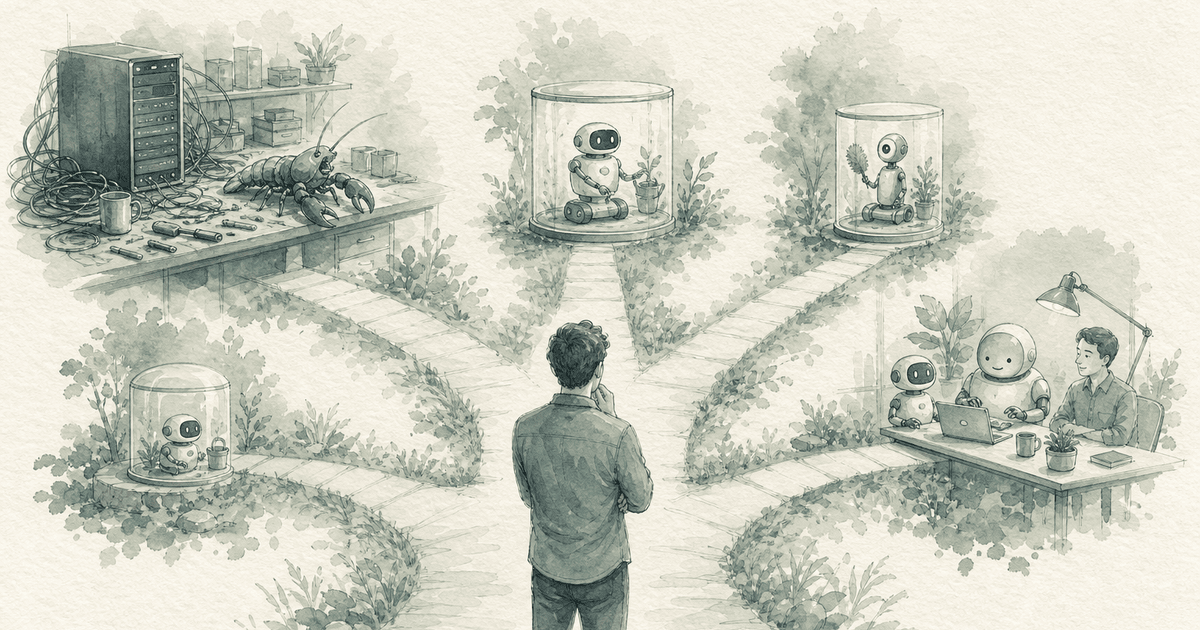
OpenClaw is a strong open-source agent. Dooza is a managed alternative to self-hosting OpenClaw. The real choice is not which one is more capable. It is who runs, secures and maintains the agent: you, or Dooza.

An earlier version of this article said OpenClaw lacks scheduling, a dashboard, chat, skills and persistent memory. OpenClaw's own documentation shows it has all of these, so we rewrote the comparison. Every OpenClaw fact below comes from openclaw.ai and docs.openclaw.ai, checked October 7, 2026.

The short version: if you are comfortable running software on your own machine or server, OpenClaw gives you a capable, free, MIT-licensed agent. If you would rather have AI employees set up and run for you by Dooza engineers, with a refundable pilot, Dooza is the managed path.

If you want to understand OpenClaw first, read our complete OpenClaw guide. For the business side of AI employees, see our guide to AI employees and OpenClaw.
What Is OpenClaw? (Quick Recap)

OpenClaw (formerly Clawdbot, then Moltbot) is an open-source AI assistant that runs on your own Mac, Windows or Linux machine. You bring hosted, subscription-backed, gateway or local models, talk to it on messaging apps such as WhatsApp, Telegram, Discord and Slack, and it can browse the web, fill forms, read and write files and run shell commands.

It is MIT licensed, with no paid version and no hosted tier, and it has a very large developer community (over 390,000 GitHub stars as of October 7, 2026).

Open Source

Free, MIT licensed, no paid version

Runs on Your Machine

State lives on your machine, not a vendor cloud

Any Model

Hosted, subscription, gateway or local models

Extensible

Bundled skills plus community skills on ClawHub

So What's the Trade-off?

OpenClaw is a complete agent you host yourself. Self-hosting means you install it, choose and pay for the models, connect your accounts, decide what to automate, review its security settings and keep it updated. Dooza runs that work for you. That is the whole difference this article is about.

What Self-Hosting OpenClaw Actually Involves

Getting started is easier than many guides suggest. The default install is a one-line installer, followed by an onboarding wizard (openclaw onboard). Docker is one option, not a requirement. The ongoing work is what you sign up for:

Install

Install and onboard

Run the installer and the onboarding wizard on a machine you control. If you want it running around the clock, that machine has to stay on and online.

Models

Choose and pay for models

You bring the models. Cost depends on which models you pick and how much the agent does, so you watch usage and set limits yourself.

Configure

Connect channels, skills and automations

Pick the channels you use, enable bundled or community skills, and write the automations (OpenClaw's built-in scheduler) that make the agent work without being asked.

Secure

Review security

OpenClaw ships with conservative defaults: the Gateway binds to loopback, group access is allowlisted, and you choose full access or a sandbox. It also includes an openclaw security audit command. Exposing it to the internet or giving it more access is your call and your responsibility.

Maintain

Update and support it

There is no paid version or vendor support. Help comes from the docs, GitHub and the Discord community, and you apply updates and fix problems yourself.

The honest summary:

For a developer running an agent for themselves, this is very manageable. It gets heavier if you want to run agents for a business team or for clients, because that time comes out of running the business.

What OpenClaw Includes, and What Stays Your Job

Here is what OpenClaw's documentation says it includes, next to the part that remains yours when you self-host:

1

Scheduling

OpenClaw includes: Automations are OpenClaw's built-in scheduler; they wake the agent at the right time.

Still your job when self-hosting: Writing, testing and monitoring each automation.

2

Dashboard

OpenClaw includes: The Control UI is a web app served by the Gateway.

Still your job when self-hosting: Hosting it and keeping access to it safe.

3

Chat

OpenClaw includes: Talk to it on WhatsApp, Telegram, Discord, Slack and more (29 channels), or through the Control UI.

Still your job when self-hosting: Connecting and maintaining each channel account.

4

Skills

OpenClaw includes: Bundled skills plus local overrides; community skills and plugins on ClawHub.

Still your job when self-hosting: Choosing, vetting and configuring skills for your jobs.

5

Memory

OpenClaw includes: Remembers things in plain Markdown files in the agent's workspace, with no hidden state.

Still your job when self-hosting: Backing up the machine those files live on.

6

Multiple agents

OpenClaw includes: Runs multiple isolated agents in one Gateway process, each with its own workspace; a team can share one gateway.

Still your job when self-hosting: OpenClaw's docs say it is not a hostile multi-tenant security boundary, so serving separate clients safely takes extra isolation work.

7

Security

OpenClaw includes: Conservative defaults (loopback binding, allowlisted group access, optional sandbox) and an openclaw security audit command.

Still your job when self-hosting: Reviewing settings whenever you widen access, and keeping up with updates.

What about cost?

OpenClaw itself is free. What you pay is model usage (which depends entirely on your models and workload), the machine it runs on, and your own time to set it up and maintain it. We don't publish a dollar estimate here because those numbers vary too much from one setup to the next.

What Dooza Gives You Instead

Dooza is an AI-native company that builds AI products and services for small businesses, from custom AI agents built and maintained by Dooza engineers to done-for-you AI receptionist, customer support and AI visibility services. Every product starts with a refundable pilot: 100% refund within 14 days. Instead of hosting an agent yourself, you get AI employees that Dooza engineers set up and run for you.

6 Ready-Made AI Employees

Maily (Email), Somi (Social Media), Ranky (SEO), Rachel (Receptionist), Stan (Sales), Linda (Legal).

Scheduled Work

AI employees work on a schedule, do their job, and report back. Social posts in the morning, weekly reports on Monday.

Security

Encrypted connections and your approval on anything sensitive.

Nothing to Host

No machine to keep on, no installs, no updates to apply. Dooza runs and maintains it.

Dashboard & Workstations

Each AI employee has its own workspace: content calendars, analytics, conversation history.

Refundable Pilot

A Dooza engineer scopes your pilot on a free 30-minute call and configures your AI employees. Your brand voice, your workflows, your tools. 100% refund within 14 days.

Setup: Same Day

Book a free 30-minute call to scope your pilot. A Dooza engineer configures everything, and Workforce AI employees can start working the same day.

Self-Hosted OpenClaw vs Dooza: Side-by-Side

FeatureOpenClaw (self-hosted)Dooza
Software costFree (MIT licensed)Depends on the product (see /pricing)
Model costsYou pay your model provider directlyIncluded in the product
How to startOne-line installer + onboarding wizardFree 30-minute call, then a refundable pilot (100% refund within 14 days)
Who runs itYou, on your machine or serverDooza
SchedulingBuilt-in scheduler (Automations)Built in, set up for you
DashboardControl UIPer-employee workstations
Chat channels29 channels incl. WhatsApp, Telegram, SlackDooza app and your connected tools
SkillsBundled + community skills6 ready-made AI employees
MemoryMarkdown files in the agent workspaceManaged by Dooza
SecurityConservative defaults; you review and maintain themEncrypted connections and your approval on anything sensitive
Serving separate clientsNot a hostile multi-tenant boundary; extra isolation neededEach business has its own account
SupportDocs, GitHub, Discord communityDooza engineers
MaintenanceYou apply updates and fixesDone for you
Control and customisationFull control over every layerConfigured to your workflows; custom agents via Dooza Agents

OpenClaw details from openclaw.ai and docs.openclaw.ai, checked October 7, 2026.

What You Pay For in Each Path

We used to publish a dollar model for self-hosting. It was our own estimate, not a sourced figure, so we removed it. Here is what each path actually charges you for:

Self-hosted OpenClaw

SoftwareFree
ModelsYour provider's rates
Machine / hostingYours
Setup and maintenanceYour time
SupportCommunity

Dooza

ProductDepends on product
ModelsIncluded
HostingIncluded
Setup and maintenanceDone by Dooza engineers
Pilot scoping callFree

The difference

Your time vs. a managed service

OpenClaw costs nothing to license and asks for your time. Dooza pricing depends on the product, and every product starts with a refundable pilot — 100% refund within 14 days.

Who Should Use What

OpenClaw is the better pick for a lot of people. Here is the honest breakdown:

Choose OpenClaw If...

  • You're comfortable installing and running software yourself
  • You want a personal assistant that runs on your own machine, with your data kept there
  • You want to pick your own models, including local ones
  • You want full control over every layer, and the source code
  • You'd rather spend time than money

Choose Dooza If...

  • You want AI employees working for your business without hosting anything
  • You're a business owner, not a developer
  • You need email, social media, SEO, calls, sales, and legal handled
  • You want it set up and maintained by Dooza engineers
  • You want to start with a refundable pilot (100% refund within 14 days)

Need a Custom Agent?

If you want custom AI agents but don't want to host and maintain them, Dooza Agents is Dooza's AI agentic platform: Dooza engineers build and maintain custom agents around your workflows, and handle hosting, security, and deployment. You define the job. We run the agent.

Read our guide to AI employees and OpenClaw →

The Question That Matters

Ask yourself: "Do I want to run an AI agent, or have the work done?" If you enjoy running it, OpenClaw is a great choice. If you would rather spend that time on your customers, a managed service fits better.

Book a 30-Minute Call; AI Employees Start the Same Day

1

Start Your Pilot

Every Dooza product starts with a refundable pilot — 100% refund within 14 days. Pricing depends on the product; see /pricing.

2

Book a Free Pilot Call

A Dooza engineer configures your AI employees — Maily (email), Somi (social), Ranky (SEO), Rachel (receptionist), Stan (sales), and Linda (legal) — to match your business, brand voice, and workflows.

3

Your AI Team Starts Working

AI employees begin handling email, posting content, answering calls, generating leads, optimizing SEO, and drafting legal documents, with your approval on anything sensitive.

Rather Not Run It Yourself?

Dooza is a managed alternative to self-hosting OpenClaw: AI employees that take real actions, set up and maintained by Dooza engineers. Start with a refundable pilot — 100% refund within 14 days.

Frequently Asked Questions

What is OpenClaw?

OpenClaw (formerly Clawdbot, then Moltbot) is a free, MIT-licensed, open-source AI assistant that runs on your own Mac, Windows or Linux machine. You bring your own models, talk to it on messaging apps like WhatsApp, Telegram, Discord and Slack, and it can browse the web, fill forms, manage files and run commands. It includes a built-in scheduler, a web Control UI, bundled skills and Markdown-file memory.

Is OpenClaw free?

Yes. OpenClaw is MIT licensed and has no paid version or hosted tier. What you pay for is model usage (which depends on the models you choose and how much the agent does), the machine it runs on, and your own time to set it up and maintain it.

What is the difference between OpenClaw and Dooza?

OpenClaw is an agent you host and run yourself. Dooza is a managed alternative to self-hosting OpenClaw: Dooza engineers set up and run AI employees for your business, so there is nothing to install, secure or update. Every Dooza product starts with a refundable pilot (100% refund within 14 days).

Can I use OpenClaw for business?

Yes. A team can share one OpenClaw gateway, and it can run multiple isolated agents. OpenClaw's own security docs say it is not a hostile multi-tenant security boundary, so if you want to serve separate clients from one setup you need extra isolation work. Self-hosting also means you handle updates, security reviews and support yourself.

How hard is OpenClaw to set up?

The default install is a one-line installer followed by an onboarding wizard (openclaw onboard); Docker is optional. Most of the effort comes afterwards: choosing models, connecting channels, writing automations, reviewing security settings and keeping it updated.

Is Dooza an alternative to self-hosting OpenClaw?

Yes. Dooza is an AI-native company that builds AI products and services for small businesses, and its Dooza Workforce app is a managed alternative to self-hosting OpenClaw. Dooza runs and maintains the AI employees for you, with encrypted connections and your approval on anything sensitive.

What if I want to customize my AI employees?

A Dooza engineer scopes your pilot on a free 30-minute call and configures AI employees to match your business, brand voice, and workflows. If you need something the ready-made employees don't cover, Dooza Agents is the AI agentic platform where Dooza engineers build and maintain custom agents for you.

Related Articles

Best OpenClaw Alternatives in 2026: Self-Hosted, Lightweight, and Managed Options Compared
Comparison

Best OpenClaw Alternatives in 2026: Self-Hosted, Lightweight, and Managed Options Compared

OpenClaw is free, MIT-licensed, and the most-starred personal agent on GitHub, but you run it, pay the model bill, and own the security. Here are the alternatives worth a look in 2026, with sourced facts, a comparison table, and an honest note on when to stay with OpenClaw.

12 min read
Read
Surfer SEO vs Ahrefs: Honest Comparison (+ Secret 3rd Option)
Comparison

Surfer SEO vs Ahrefs: Honest Comparison (+ Secret 3rd Option)

Surfer SEO (content optimization, AI visibility, Surfy agent) vs Ahrefs (backlinks, keywords, site audits), with both vendors' current plans checked on October 7, 2026.

12 min read
Read

Ready to scale your business?

Start with a refundable pilot — 100% refund within 14 days. A Dooza engineer scopes it with you on a free 30-minute call. Pricing depends on the product; see pricing.

Refundable pilot · 100% refund within 14 days · No contracts